True Collaborative Conceptualization title
Featuring a radical drag-and-drop 3D environment, INOVATE delivers unmatched ease-of-use to speed up conceptual design and involve more stakeholders in the process. INOVATE also imports standard file formats — such as ACIS, PARASOLID, IGES, and STEP — and exports to those same file types so that stakeholders using other 3D CAD software can fully participate in workflows involving INOVATE. Use INOVATE TRANSLATOR to even import Native file formats to extend your capabilities.

Simple, Dynamic, Powerfulle
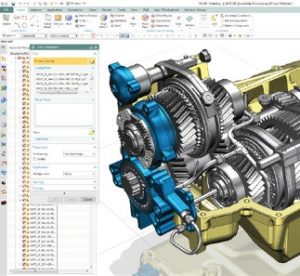
IRONCAD 3D modeling software empowers designers to focus on design by giving them an intuitive platform that mirrors how we interact with the physical world. Easily reposition components with the patented TriBall™ visualization tool, resize objects by stretching them with handles, and drag and drop predefined shapes into the design scene for a better, faster design process.

Fluid Design Methodology
IRONCAD is a desktop 3D and 2D design program that allows users to choose from parametric, direct, or a combination of both modalities on demand in a single environment. This allows designers to freely explore design ideas and create models dynamically on screen without having to pre-plan and map out the concept in advance. With IRONCAD, engineers can use one tool to manage the entire design process from concept to production.

Unified Design Environment
3D models made in IRONCAD only require one file, no matter how complex. Assembly part data is integrated into a file’s unified design environment, rather than linking to external files. Feature, part, and assembly data can be stored in catalogs which can be pre-built to include frequently used parts and assemblies, freeing designers to be more productive and allowing them to extend the use of 3D data throughout the enterprise.

2D Detailing for 3D Data
IRONCAD DRAFT is an affordable, powerful 2D CAD software with an easy-to-learn user interface and unique 3D integration capabilities. Use IRONCAD DRAFT to analyze, leverage, render, and reference 3D model data created by customers and colleagues while still working in a 2D CAD environment with a familiar user interface and common tools for detailing.

Extrude, Spin, Sweep, Loft 3D
Similar to general 3D CAD, it is a function to create sketches and modeling. Use this method to create shapes that are standard and not in the catalog.

2D shape sketch
DWG/DXF can be imported as a cross section. You can select layers to import, such as center lines and hidden lines. You can also place it in 3D space and modeling while referring to it.

2D curve/3D curve function
You can create precise curves by specifying the control point positions and tangent size of the spline numerically. (Usage scenarios: 3D sweep, guide curve loft, surface shape creation, etc.) You can also create intersection curves, projection curves, and UV curves.

Surface function
A function that creates surface shapes from faces or 3D curves. It is also possible to use existing parts or surfaces from imported models. The surfaces you create can be thickened or cut into solids.

Mechanical parts
Mechanical parts such as bolts, taps, special holes, bearings, springs, gears, etc. can be easily created.

Mechanism Mode
Operation verification is possible by assembling and placing placement constraints. You can check for collisions and interference in real time.

Animation creation
It is possible to simulate motion using animation. Various animation paths are available in the catalog. Can also be used within Mechanism mode.

3D PMI (Product Manufacturing Information) Annotation
You can include dimensions, notes, tolerances, surface finishes, welds, and datums in your 3D models. These can be carried over to the 2D environment (CAXA Draft).

Placement constraints/geometric constraints
This function allows you to set conditions such as angles when aligning parts or drawing in a sketch. Restraints are applied only where necessary.

Analysis/various automatic calculations
Mass properties such as volume, mass, surface area, center of gravity, and moment of inertia can be calculated automatically. You can define your own custom properties to create an automatic bill of materials (BOM). Excel output is also available.

Design variations
By setting parameters such as dimensions, you can match the variations of assemblies/features/parts. The values entered in the parameter table will be automatically reflected

Sheet metal design and development
The catalog includes bent and punched shapes, so you can design sheet metal by dragging and dropping. Parts created by shelling etc. and imported parts with no history can also be expanded. It also supports reading 2D development drawings, converting them to 3D, and bending them.

Sub Title
Rendering
By setting exposure, shadows, background, etc., you can create a realistic 3D space. Useful for creating CG for presentations and pamphlets.

3D → 2D cooperation
Automatic 3D and 2D linkage allows you to easily create projections (2D file extension is .exb). Changes to the 3D model will be reflected automatically (the reverse is not possible). 3D model property information can also be output to the bill of materials. Useful for creating assembly drawings and parts drawings.

Tolerances/symbols/dedicated functions
Includes the dimensions, tolerances, notes, and symbols you need to create mechanical drawings. (Example) Library of dimensional tolerances, geometric tolerances, welding symbols, surface finish symbols, notes, center lines, shaft drawings, gear drawings, bolts and taps, etc.

Automatic dimensions/automatic hole table
You can create automatic dimensions and automatic hole tables. It is possible to significantly reduce the time and effort required to write dimensions on base plates with numerous taps and holes.
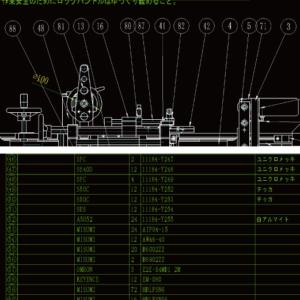
Parts list, balloons
You can automatically create bill of materials and balloons linked to parts and assemblies. It supports both 3D scenes and 2D drawings. It is also possible to output to EXCEL.